


Spider Solitaire - Card Games
4.72.81K Reviews
App Specs
- Version
- 1.16.4.20251024
- Updated On
- License
- Free
- Downloads
- 10,000,000+
- Developer
- Fantasy Games Ltd
- Categories
- Card
- Platform
- Android, iOS
Screenshots
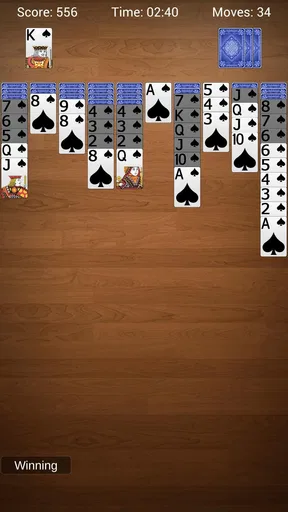
 Analysis by AppCompare
I approach a solitaire game as a small break with a clear beginning: open it, make a move, and see whether the cards start to cooperate. Spider Solitaire - Card Games is built around that familiar, satisfying routine. It turns the classic Spider format into something I can pick up for a quick pause or settle into when I have longer to think. The appeal is not a complicated story or a stream of new systems; it is the chance to spot a useful sequence, test a plan, and decide whether the next deal deserves another try.
That makes this a good fit for anyone who wants a focused card game rather than a busy collection of modes. I also think it suits players who enjoy improving through practice: the decisions are easy to understand, but a crowded tableau can still make a careless move costly. If you prefer fast action, changing objectives, or frequent social competition, this particular kind of solitaire may feel too quiet. Its strength is the opposite: it gives your attention one manageable problem at a time.
Start with a move you can learn from
The first decision in Spider Solitaire is rarely dramatic, but it sets the tone. I scan the visible cards for a move that opens a column or extends a descending run, then check whether that choice leaves another useful option available. When the board is partly blocked, it can be tempting to move the first available card simply to make progress. I find it more rewarding to pause for a moment and ask what the move will reveal or free up.
This is where the game’s different suit counts matter in practice. One suit is a sensible place to learn how sequences behave and how empty spaces can help reorganize cards. Two suits make planning less forgiving, while four suits ask for more careful attention to suit matching as well as rank order. I would not treat the toughest setting as the automatic goal: choosing a level that lets you think clearly is often more enjoyable than turning every session into a test of patience.
As a card game from Fantasy Games Ltd, it keeps the central task recognizable rather than dressing it up with a separate theme. The store summary calls it a classic Spider experience, and that description points to its straightforward identity; what matters during play is whether the board gives you enough room to make considered choices. I find the best opening habit is to look across all columns before committing, especially when a move could cover a card you have not yet had a chance to uncover.
The rhythm of hints, reversals, and decisions
The game’s feedback comes from the board itself. A move can reveal a hidden card, make a sequence easier to shift, or leave the layout looking tighter than before. That immediate change is useful because it lets me judge the consequences of a decision without needing a long tutorial. When I reach a position where several choices look equally plausible, the hint system can offer a nudge; I use it as a prompt to reconsider the board, not as a substitute for understanding why a move helps.
Unlimited undos are particularly useful for learning. I can test a move, notice that it blocks a better route, and step back without having to abandon the whole deal. A practical way to use this is to treat undo as a comparison tool: try one sequence, rewind, then see whether another choice opens more room. That keeps experimentation low-pressure, though it can also make a win feel less meaningful if I reverse every uncomfortable decision. I prefer to use it deliberately rather than erase every mistake as soon as it appears.
Worth Reading Before You Choose

EA SPORTS FC Mobile 26 Is a Bigger Football Game, but It Takes Time

Flipboard Shows What News Apps Must Do Beyond the Feed

Switching to Android Auto Means Rethinking Your Driving Routine

Google Calendar Makes a Crowded Week Easier to Manage

Ludo King Makes the Most of the Minutes Between Plans

Baby Panda World Brings Quick Play to Modern Phones, but Its Game Library Feels Busy
There is a trade-off here. Hints and reversals make the game approachable, but players who want a strict, no-assistance challenge may prefer to ignore them or choose a different solitaire app with rules and presentation better suited to that preference. For me, they work best as optional training wheels. They help when I am learning a tougher suit setting or playing while distracted, while the real satisfaction still comes from noticing a sequence for myself.
Small rewards that make another deal tempting
Spider Solitaire does not need a large reward system to keep me interested. The payoff is often a column finally clearing, a buried card becoming available, or a messy tableau turning into a sequence I can manage. Completing a deal is satisfying, but even a promising improvement in the layout can make a short session feel worthwhile. That makes the game easy to fit between other tasks without requiring a long commitment every time I open it.
The statistics add a longer-term reason to return. Seeing games played, win rate, and winning streak gives me a way to notice whether a strategy is helping, although I would read those figures in context. A run of easier one-suit games is not a fair comparison with difficult four-suit deals. If I want the numbers to tell me something useful, I stick to the same difficulty for a while and focus on one habit, such as clearing a column sooner or being more selective about moving cards that expose nothing useful.
Customization is a quieter reward. Changing card backs or backgrounds will not alter the decisions, but a familiar visual setup can make repeated sessions feel more comfortable. I see that as a small personal touch rather than a major feature. The useful question is whether the cards remain easy for you to scan; when choosing a look, readability matters more than novelty, particularly during a long game with several overlapping sequences.
How it fits into an ordinary day
A realistic use for this game is a waiting-room pause or a quiet stretch on a commute. I can open a deal, make a few moves, and put the phone away when my stop arrives; the game’s basic format is easy to resume as an activity, even when I do not have time to concentrate for a long session. Its offline play is also handy when a connection is unreliable or when I would rather keep a simple pastime available without relying on Wi-Fi.
That offline convenience makes it different from card games built around opponents, live matches, or online events. Those alternatives are better if the main attraction is competition or interaction. A conventional Klondike solitaire game is a closer comparison, but Spider asks me to manage longer runs and more interdependent columns, so it tends to reward broader planning. I choose Spider when I want a deeper layout to untangle; I choose a simpler solitaire variant when I have only a moment and want fewer decisions.
For a first session, I would start with one suit, take time to inspect the columns before drawing or rearranging cards, and use undo to learn from a move rather than to chase a perfect run. Once the board begins to feel familiar, moving up in suits gives the same basic game a more demanding planning problem. This gradual approach is more useful than deciding that the hardest setting is the only one worth playing.
Gameplay and Features
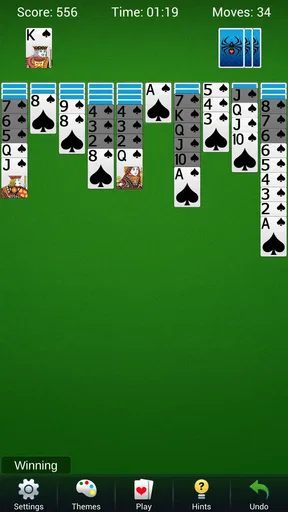
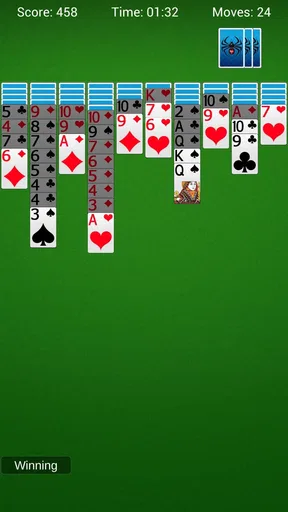
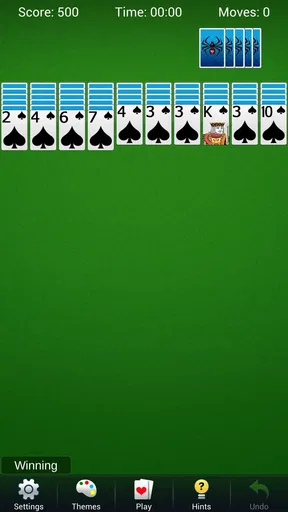
First off, let me just say that opening this app is like stepping into a card player's paradise. The layout is clean, the cards are easy to read, and the overall design just feels right. It’s like the developers knew exactly what we were looking for in a digital card game experience.
The app offers several difficulty levels—one suit, two suits, and the ultimate challenge, four suits. Trust me, if you're up for testing your skills, the four-suit level will keep you on your toes. Each game is like a puzzle waiting to be solved, and there’s nothing quite like the satisfaction of finally getting all those cards in order!
One of the things I really appreciate about Spider Solitaire - Card Games is the hint system. If you're ever stuck, a little nudge in the right direction can make all the difference. Plus, the app offers unlimited undos, which is perfect for those “oops” moments we all have. No shame in taking a step back to rethink your strategy.
Customization Options
Now, let's talk about customization. The app gives you several options to make the game truly yours. You can choose from different card backs and backgrounds to give the game a personal touch. It might seem like a small thing, but having that level of customization really enhances the overall experience.
For those who like to track their progress, the app offers detailed statistics. You can see how many games you've played, your win rate, and even your longest winning streak. It's a great way to challenge yourself and see just how much you've improved over time.
Performance and Usability
Let’s be honest, nobody likes an app that’s slow or crashes mid-game. Fortunately, Spider Solitaire - Card Games runs smoothly on both Android and iOS devices. The interface is intuitive, making it easy to pick up and play, even if you're on the go. The app doesn't bog down your device, so you can enjoy your games without any hiccups.
One little feature I love is the ability to play offline. Whether you’re commuting, on a plane, or just in an area with spotty Wi-Fi, you can still enjoy your favorite card game without any interruptions. It's a lifesaver for those long trips or when you just want to disconnect for a bit.
Final Thoughts
Overall, Spider Solitaire - Card Games is a fantastic app for anyone who loves card games. It's got a great mix of nostalgia and modern usability that makes it a joy to play. Whether you're looking to kill a few minutes or dive into a serious gaming session, this app has you covered.
So, if you're ready to channel your inner card shark, give it a download. Trust me, once you start playing, you'll be hooked. Who knew stacking cards could be so addictive?
What to know before installing
The game is free to download, with optional in-app purchases priced from $0.99 to $9.99 per item. I would go in expecting a free solitaire experience with paid extras available, rather than assuming every item or option is included at no cost. If you prefer not to spend, it is worth checking purchase prompts carefully and sticking to the basic play experience that suits you.
It is rated for Everyone, which makes the familiar card format suitable for a broad audience. The game was released on May 10, 2019, and its current version is 1.16.4.20251024; it requires Android 6.0 or later. The scale of its audience is notable, with over 10 million installs and an average rating of 4.7 from around 83,000 ratings. Those figures suggest that many players have found the basic format appealing, but they do not tell me whether its pace or presentation will suit your tastes.
I would recommend it most to people who like deliberate, solo puzzles and want a game that can be played in short stretches without a social commitment. It is less suitable if you are looking for multiplayer, constant novelty, or a strong sense of progression beyond improving your own play. For me, its best quality is how readily it turns a spare moment into a focused little challenge; its limitation is that the same familiar loop can feel repetitive if I want each session to introduce something new.
The loop works because every action produces a visible consequence, and every consequence gives me another decision. A good move opens possibilities; a poor one can be undone and reconsidered; a cleared sequence offers a small payoff; then a fresh deal presents another arrangement to solve. I find that cycle easy to return to, provided I want calm concentration rather than spectacle. If that is the kind of break you are after, this is a straightforward way to get it.
Pros
- Intuitive touch controls for easy gameplay.
- Variety of difficulty levels available.
- Minimalist design enhances focus.
- Offline play without ads.
- Daily challenges keep it engaging.
Cons
- Limited customization for card themes.
- No multiplayer or social features.
- Occasional performance lags on older devices.
- In-app purchases can be pricey.
- Limited tutorial for beginners.
FAQs for Spider Solitaire - Card Games
What is Spider Solitaire - Card Games?
Spider Solitaire - Card Games is a classic card game app available on both Android and iOS platforms. It offers a digital version of the traditional solitaire game with multiple difficulty levels, customizable settings, and smooth gameplay. The app is designed for both casual players and solitaire enthusiasts, providing an engaging and challenging experience.
Is Spider Solitaire - Card Games free to download and play?
Yes, Spider Solitaire - Card Games is free to download and play. However, it may offer in-app purchases for additional features, such as ad removal or additional themes. While the core gameplay is accessible without cost, optional purchases can enhance the user experience or provide cosmetic upgrades.
What features does Spider Solitaire - Card Games offer?
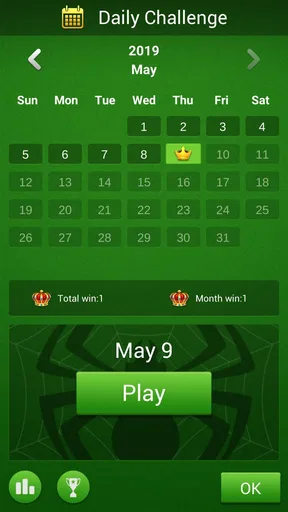
Spider Solitaire - Card Games includes features like customizable themes, adjustable difficulty levels, daily challenges, and detailed statistics. Players can also enjoy smooth animations and intuitive controls, making the game accessible to both new and experienced players. These features combine to provide a comprehensive and enjoyable solitaire experience.
Does Spider Solitaire - Card Games require an internet connection?
No, Spider Solitaire - Card Games does not require an internet connection to play. This makes it a perfect choice for users who want to enjoy the game on the go, without worrying about data usage or connectivity issues. However, an internet connection might be needed for certain features like daily challenges or in-app purchases.
Are there any ads in Spider Solitaire - Card Games?
Yes, Spider Solitaire - Card Games may contain ads, especially since it is a free app. These ads help support the developers and keep the game free for users. For those who prefer an ad-free experience, there is often an option to remove ads through a one-time purchase or subscription.


